


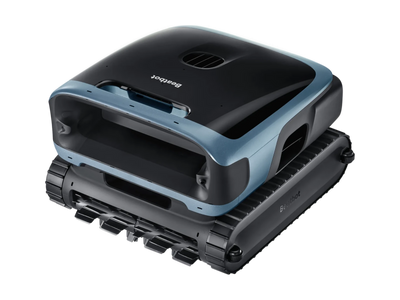
Sora 70 P7 support
- 3-Year Warranty
- Up to 5 h floor, 7 h surface
- Up to 300 m²
Getting started
- Charge it. Plug the charger in indoors, somewhere cool and dry, and connect the robot. It arrives part-charged, so a yellow light is normal. A full charge takes about 4.5 hours, and the light turns solid green when it's done.
- Get the app and an account. Download the Beatbot app from the App Store or Google Play, create an account with your email, and sign in.
- Pair it by Bluetooth. Turn on Bluetooth and location on your phone, tap Add Robot in the app and stand next to the Sora 70 P7. Put it into pairing mode (hold the mode switch for 5 seconds until the light flashes blue), then pick it from the list. If it doesn't show, scan the QR code on the robot or add it manually.
- Connect it to your WiFi. Choose your home network and enter the password. The Sora 70 P7 works on 2.4 GHz or 5 GHz WiFi, so either band is fine. Keep it within about 40 m of your router while you set it up.
- Put it in the pool. Take out toys and towels, keep people and pets out, and turn your pool pump off for the best result. Lower it into the water along the wall. It sinks, settles on the floor within about 5 minutes and starts cleaning. When it's done, it parks at the edge. Lift it out by the handle and it drains itself.
Can I use it without the app?
Yes. Push the mode switch on the back to start a clean. The app adds scheduling, extra modes and cleaning history.
Using it
Can I lift it out mid-clean?
End the clean in the app first. In Surface mode its water jet is running, so lifting it straight out will splash you.
Will it go over my infinity or overspill edge?
No. It's designed to stop at the edge. On an infinity pool it explores the pool in a zigzag first, then cleans.
Why does the app lose connection while it's cleaning?
That's normal. WiFi doesn't travel through water, so the robot goes offline underwater and reconnects when it surfaces, then syncs the clean.
Will it clean my sun shelf, bench or steps?
It cleans shelves and benches with 20 cm of water or more, if they're wider than the robot (about 50 cm). It can't clean standard steps or child safety ledges, because it's...
Which cleaning mode should I use?
The switch on the robot has two settings: Pro mode cleans the floor, walls, waterline and surface, and Preset mode runs Standard (floor, walls and waterline) unless you change it in the...
Troubleshooting
The 10 things owners ask us about most, with step-by-step fixes.
01It missed spots on its first clean
Usually not a fault: it builds up coverage as it cleans, so judge it on a full, uninterrupted clean in Pro mode. Missing the same spots after a few full cleans? Send us a short video.
02It won't connect to the app
Turn on Bluetooth and location on your phone, stand next to the robot and try again. If setup fails or it's linked to another account, hold the mode switch for 5 seconds to restart setup, then follow the app.
03The app says it's offline
It may be underwater, out of WiFi range or out of charge. It reconnects once it surfaces or is charged. Changed your WiFi name or password? Add it again in the app.
04It doesn't move after I put it in
Give it about 5 minutes. It releases the air from its float chambers before it sinks and starts.
05It stopped on the pool floor
Check it isn't in ECO mode, which stays on the floor and cleans every other day. If it's stuck near a drain and the light flashes orange, lift it out with the hook. A full basket can also stop it, so empty it.
06It won't charge
Check the charger is pushed fully into the port, and that the contacts on the robot and charger are clean and dry. Gently clean off any rust or residue. A corroded charger that stops working is covered by your warranty.
07It didn't come back to the edge
A full basket or a flat battery are the usual causes. Retrieve it with the hook, charge it and empty the basket. It floats if the battery runs out, so it won't sink.
08The light is flashing orange
That means an error. Lift it out, empty the basket, clear hair from the propeller, then restart it. Still flashing? Call 0485 000 320 with a photo or video.
09It's noisy after it finishes
That's it draining. It takes about 5 minutes.
10It isn't cleaning my steps
No robot can clean a standard step, because it's smaller than the robot. It does clean shelves and benches with 20 cm of water or more, if they're wider than the robot (about 50 cm).
Maintenance and care
Should I use the 3 µm fine basket all the time?
No. Use it for fine silt and pollen, then swap back. It makes the robot work harder and shortens the runtime.
What water conditions does it need?
Salt up to 5,000 ppm, chlorine up to 4 ppm, pH 7.0 to 7.8, and water between 6 and 35 °C. Charge it between 0 and 40 °C.
How do I store it over winter?
Drain it fully, store it indoors somewhere cool and dry, out of the sun, and charge it to about half every 6 months. The manual shows the switch sequence that drains it...
How do I clean the brushes?
Release the tabs, remove the rubber brush strips, rinse off the debris, then thread the tabs back through each slot.
What do I do after every clean?
Take it out of the pool, empty the basket and rinse it with a hose. It takes about 5 minutes.
Manuals and downloads
- Sora 70 P7 user manualPDF · US editionDownload (opens in a new tab)
- Quick start guidePDF · US editionDownload (opens in a new tab)
- Warranty and returns30-Day Money-Back Guarantee and warranty termsOpen
- Beatbot appApp Store · Google PlayOpen
For help in Australia, call our team on 0485 000 320.
Still stuck? Our Australian team will help
Talk to our team
Tell us what the Sora 70 P7 is doing and we will help you get it sorted, often in one call.
Mon-Fri 9am-5pm AEST. Missed calls returned within 1 hour, messages within 1 business day.Think it's a fault?
We help with your warranty claim and pay the freight both ways. Have your serial number and proof of purchase ready.
How our warranty works