


AquaSense 2 Ultra support
- 3-Year Warranty
- Up to 10 h surface, 5 h floor, 4.5 h walls
- Up to 360 m²
Getting started
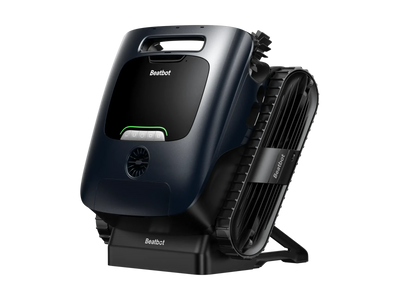
- Charge it. First fit the two side brushes: hook one end of each brush onto its hub, wrap it round and clip the other end on, then check both spin freely. Push the bracket into the back of the dock until it clicks, plug the dock in and sit the robot on it. Solid green means it's full. A full charge takes about 4.5 hours.
- Get the app and an account. Download the Beatbot app from the App Store or Google Play, create an account with your email, and sign in.
- Pair it by Bluetooth. Turn on Bluetooth and location on your phone and tap Add Device in the app. On the AquaSense 2 Ultra, hold the Power and Floor buttons together for 3 seconds until the light flashes blue, then pick it from the list. Keep your phone within 1 metre. If it doesn't show, scan the QR code on the robot or add it manually.
- Connect it to your WiFi. Choose your home network and enter the password. The AquaSense 2 Ultra works on 2.4 GHz or 5 GHz WiFi, so either band is fine.
- Put it in the pool. Have an AquaRefine Kit (sold separately)? Load it first: open the kit cover, take the cap and foil off the kit, push it in until it clicks and close the cover, then hold the Floor button for 3 seconds to switch dispensing on (the light turns purple). Clear out toys and towels and turn your pool pump off for the best result. Choose a cleaning mode in the app, then set the robot on flat ground for about 5 seconds so it can calibrate. Put it in the water and it starts by itself.
Does it work on 5 GHz WiFi?
Yes. It connects on 5 GHz or 2.4 GHz WiFi, or by Bluetooth.
Using it
Can I use it in a salt pool?
Yes, with salt up to 5,000 ppm, which covers almost every home pool. Keep chlorine under 4 ppm, pH between 7.0 and 7.8, and water between 6 and 35 °C.
Does it use the AquaRefine Kit?
Yes. It uses the AquaRefine Kit, the same clarifying kit as the AquaSense 2 Pro. The kit is sold separately. Use an opened kit within 30 days.
Can I control it from the app?
Yes, while it's on the surface. You can switch modes and steer it; WiFi doesn't reach it underwater.
How long does the battery last?
Up to 10 hours cleaning the surface, 5 hours the floor, or 4.5 hours the walls and waterline. A full charge on the dock takes about 4.5 hours.
What debris does it pick up?
Its two-layer filter (150 and 250 micron) catches leaves, hair, sand, insects and fine dirt down to 150 micrometres.
Does it clean corners?
Yes. It cleans corners while it explores the edges and during its planned clean.
How deep does my pool need to be? Can it clean steps?
It works in 0.35 to 3 m of water. It cleans platform floors with 35 cm of water or more, and platform walls with 50 cm, if the platform is wider than...
What size pool can it clean?
It's rated for pools up to 360 m². In a bigger pool, it surfaces at the edge when its battery drops to 15%; charge it and put it back near the part...
What kind of pool can it clean?
Any shape, in-ground or above-ground, with concrete, vinyl, fibreglass, tile or stainless steel surfaces.
What does the AI camera do?
It spots where the dirt is and targets those areas, so it doesn't spend time on clean floor. Its two lights let it keep working at night.
Which cleaning mode should I use?
Floor, Standard (floor, walls, waterline), Pro (adds the surface) and Custom (your own areas and time from the app). The app adds AI Quick Mode for a faster clean of the dirtiest...
Troubleshooting
The 10 things owners ask us about most, with step-by-step fixes.
01It missed spots on its first clean
Usually not a fault: it builds up coverage as it cleans, so judge it on a full clean in Pro mode. Calibrate it on flat ground first and wipe the camera. Missing the same spots after a few full cleans? Send us a video.
02It isn't finding the dirt
Wipe the AI camera, lights and sensors with a soft, dry cloth. A dirty lens stops it seeing debris.
03The water isn't getting clearer
Check the light turned purple when you switched dispensing on, and that the kit is less than 30 days old. Cloudy water also needs balanced chemistry: check your pH and sanitiser.
04It won't connect to the app
Hold Power and Floor for 3 seconds until the light flashes blue, stay within 1 metre, and turn on Bluetooth and location.
05The app says it's offline
It's underwater, out of range or out of charge. It reconnects on the surface or once charged.
06A side brush isn't spinning
Take it off, undo the bottom screw with a small screwdriver, pull out the hub and clear any hair or string.
07It's not moving, or moving slowly, on the floor
Turn off your pool pump, free it from the drain with the hook, and empty the basket.
08It won't charge on the dock
Check the dock is plugged in, the robot sits square, and the charging pins are clean.
09The light is flashing orange
A fault: clear the propellers (slide off the side panel), brushes and basket, then restart. Still flashing? Call 0485 000 320.
10It's noisy before and after a clean
It's draining, for about 3 minutes.
Maintenance and care
How do I store it over winter?
Drain it: hold the Pro button for 3 seconds and wait about 3 minutes. Take out an opened clarifying kit, put on a dust cover if you have one, store it somewhere...
What do I do after every clean?
Lift it out, let it drain, rinse the basket and brushes, and wipe the camera, then put it back on the dock.
Manuals and downloads
- AquaSense 2 Ultra user manualPDF · US editionDownload (opens in a new tab)
- Quick start guidePDF · US editionDownload (opens in a new tab)
- Warranty and returns30-Day Money-Back Guarantee and warranty termsOpen
- Beatbot appApp Store · Google PlayOpen
For help in Australia, call our team on 0485 000 320.
Still stuck? Our Australian team will help
Talk to our team
Tell us what the AquaSense 2 Ultra is doing and we will help you get it sorted, often in one call.
Mon-Fri 9am-5pm AEST. Missed calls returned within 1 hour, messages within 1 business day.Think it's a fault?
We help with your warranty claim and pay the freight both ways. Have your serial number and proof of purchase ready.
How our warranty works